Online Graph Paper – Free Virtual Graph Paper Generator
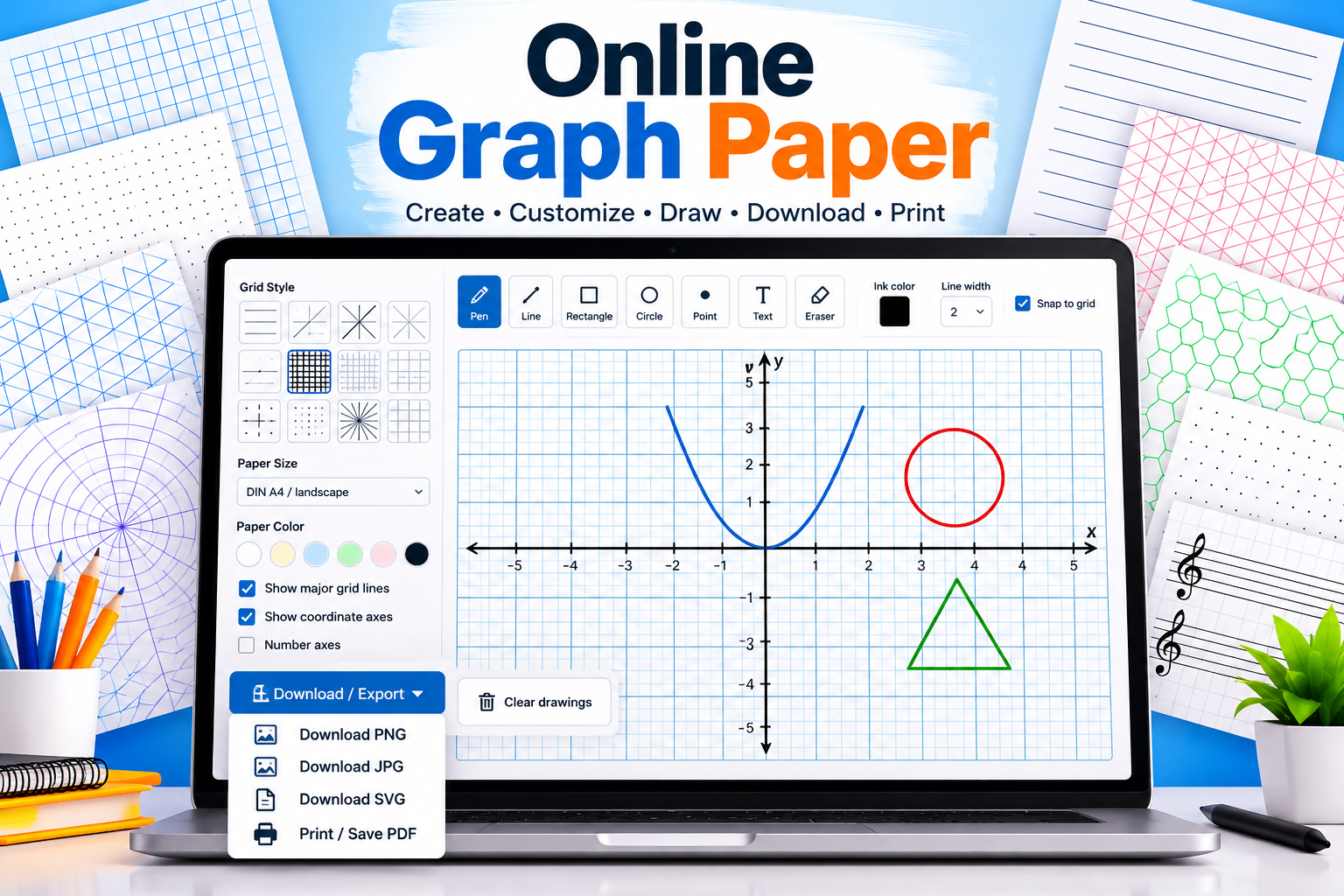
Create custom graph paper online with our free Virtual Graph Paper tool. Choose your preferred grid style, adjust grid spacing and colors, select a paper size, and draw directly on the virtual canvas. When your design is ready, download it as an image or print it using your browser.
Online Graph Paper
Customize your grid, draw on the canvas, and export or print your graph paper.
KEY FEATURES
Features of Our Free Graph Paper Generator
Customizable Grid Styles
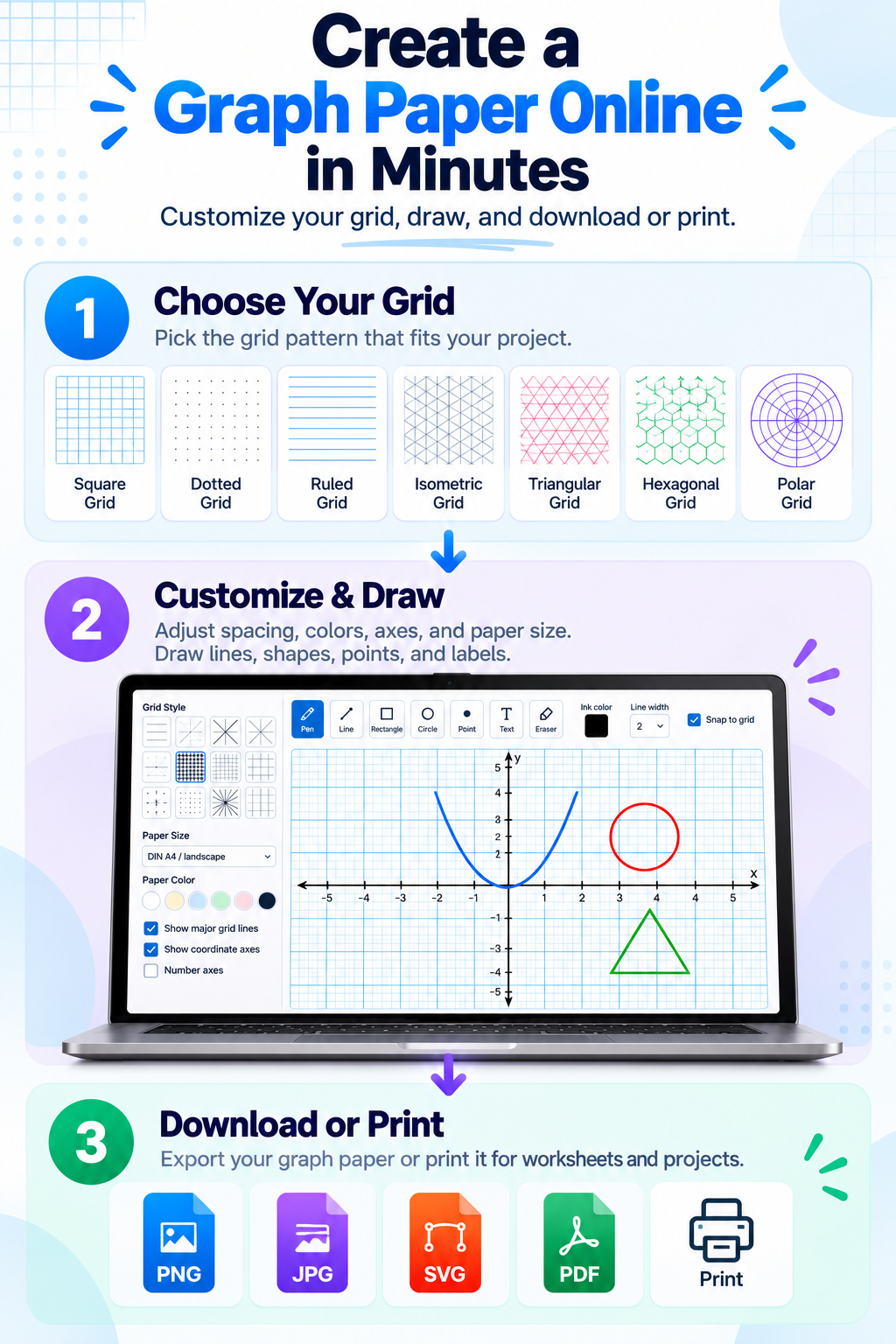
Choose from square, dotted, ruled, isometric, triangular, hexagonal, polar coordinate, and other specialized grid styles to suit your project.
Adjustable Grid Spacing
Change the spacing between grid lines to create fine or wide grids. Adjust major grid lines to make larger intervals easier to identify.
Custom Grid and Paper Colors
Choose colors for grid lines, major lines, axes, and the paper background to create a clear, personalized design.
Draw Directly on Virtual Graph Paper
Sketch and annotate directly on the canvas using freehand drawing, lines, shapes, points, and text labels. Use undo, redo, zoom, and grid snapping for easier editing.
Choose a Paper Size
Select DIN A5, A4, A3, US Letter, or a flexible canvas. Choose portrait or landscape orientation where supported.
Download or Print Your Graph Paper
Export your graph paper as PNG, JPG, or SVG. You can also print it or save it as a PDF using your browser’s print dialog.
How it works
How to Use the Online Graph Paper Tool?
Follow these steps to create your own graph paper:
- Choose a grid style. Select square, dotted, ruled, isometric, triangular, hexagonal, polar, or another available pattern.
- Adjust the grid settings. Set grid spacing, line colors, major line intervals, and other available options.
- Select your paper color. Choose a background that provides clear contrast with your grid.
- Configure the coordinate axes. Show or hide the axes and enable numbered axes when needed.
- Start drawing. Select a pen, line, rectangle, circle, point, text, or eraser tool and work directly on the canvas.
- Choose your paper size. Select an appropriate format and orientation for your project.
- Export or print your work. Open the export menu and select PNG, JPG, SVG, or the print option.
GRAPH PAPER TYPES
Types of Graph Paper You Can Create
Square Graph Paper
Square graph paper uses evenly spaced horizontal and vertical lines to form a grid of squares. It is useful for plotting coordinates, drawing geometric shapes, comparing measurements, and completing mathematics assignments.
Dotted Graph Paper
Dotted graph paper uses regularly spaced dots instead of continuous grid lines. It provides visual guidance while leaving more open space for sketches, notes, and diagrams.
Isometric Graph Paper
Isometric graph paper uses angled lines to create a triangular grid. It is commonly used for three-dimensional sketches, technical illustrations, and visualizing objects from different angles.
Triangular Graph Paper
Triangular graph paper provides a grid of triangular cells. It can help with geometric constructions, tiling patterns, and designs involving triangular shapes.
Hexagonal Graph Paper
Hexagonal graph paper uses a repeating pattern of hexagonal cells. It is useful for tessellation exercises, board-game layouts, spatial planning, and certain scientific diagrams.
Polar Graph Paper
Polar graph paper organizes the grid around a central point using concentric circles and radial lines. It is useful for understanding polar coordinates, angular measurements, and polar graphs in mathematics.
Engineering and Specialized Graph Paper
Specialized grids can help with technical sketches, measurement layouts, diagrams, and structured planning. Choose a grid that fits the task rather than forcing every project onto a standard square grid.
Music Staff Paper
Music staff paper features five parallel horizontal lines used for writing musical notes, clefs, and other musical symbols. It is ideal for composing music, learning music theory, and practicing notation.
Diagonal / Slanted Lines Graph Paper
Diagonal graph paper features parallel slanted lines, creating a pattern useful for drawing angled designs, practicing line work, exploring geometric patterns, and creating technical sketches.
FAQs
Frequenty Asked Questions
What is Online Graph Paper?
Online graph paper is a digital grid that you can customize and use directly in your web browser. Instead of searching for a pre-made sheet or drawing a grid by hand, you can create graph paper with your preferred spacing, colors, and layout.
Our virtual graph paper generator combines customizable grids with a drawing workspace. You can sketch diagrams, draw lines and shapes, add text labels, and work with coordinate axes. You can also choose a paper format for printing or save your work in a supported image format.
The tool is useful for mathematics, geometry, school assignments, technical sketches, planning, and other activities that benefit from an organized grid.
Is this online graph paper generator free?
Yes. You can use the graph paper generator in your browser without installing a separate application.
Does the online graph paper tool work on mobile devices?
The interface is responsive and designed for desktop, tablet, and mobile browsers. The available drawing experience may vary depending on your device and browser.
Online Graph Paper vs. Printable Graph Paper?
Printable graph paper is convenient when you need a physical sheet for handwriting or drawing. Online graph paper is more flexible when you want to adjust the grid before printing or work digitally.
With this tool, you can customize the grid, annotate the canvas, and export your result. If you prefer working on paper, use the print option to prepare a physical copy.
For printing, check the print preview carefully. Browser scaling and printer margins can affect the final size, so do not assume that a screen measurement will automatically match a physical measurement.
Who can use virtual graph paper generator?
Students: Plot coordinate points, practice geometry, draw graphs, and prepare mathematics assignments.
Teachers: Create worksheets, demonstrate coordinate systems, and prepare visual teaching materials.
Engineers and designers: Sketch layouts, organize technical drawings, and work with geometric patterns.
Researchers and data learners: Make coordinate sketches and illustrate mathematical relationships.
Hobbyists and planners: Create grid-based designs, patterns, diagrams, and organized sketches.